2 Getting started
2.1 Why you should use R markdown
The traditional way to write a paper is to run the analyses in R or some other software and then copy the figures, tables etc. into a word processor. Then you find an error in the code or data and need to repeat the process. Repeatedly.
This is very inefficient and error prone.
R markdown lets you have the code and the text in one document. If the code or the data are updated, new versions of the figures and tables are automatically generated and inserted into the corrected document.
This is a much more reproducible process.
2.2 Creating and knitting an R markdown file
An R markdown file is a plain text file. You can create a new text file, give it the “.Rmd” extension, and start typing. But it is better to use RStudio.
Go to the “File” menu bar, then “New File,” then “R Markdown….” The first time you do this, you may be asked to install some extra packages. Now you will have a pop-up window asking for the Title, author and output format (Fig. 2.1).
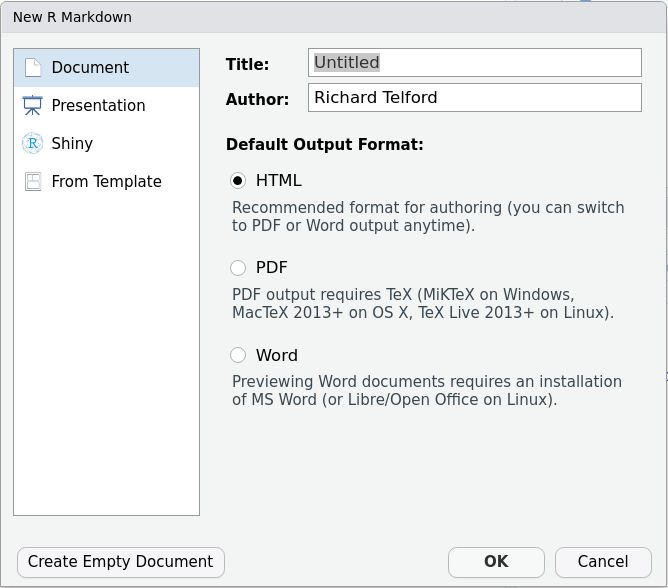
Figure 2.1: Choose the output format
You can fill these in now, or edit the document later. I recommend you start with “HTML” format as is doesn’t require anything else to be installed. When you are ready, click OK, and a new R markdown file will open. It will look something like Figure 2.2
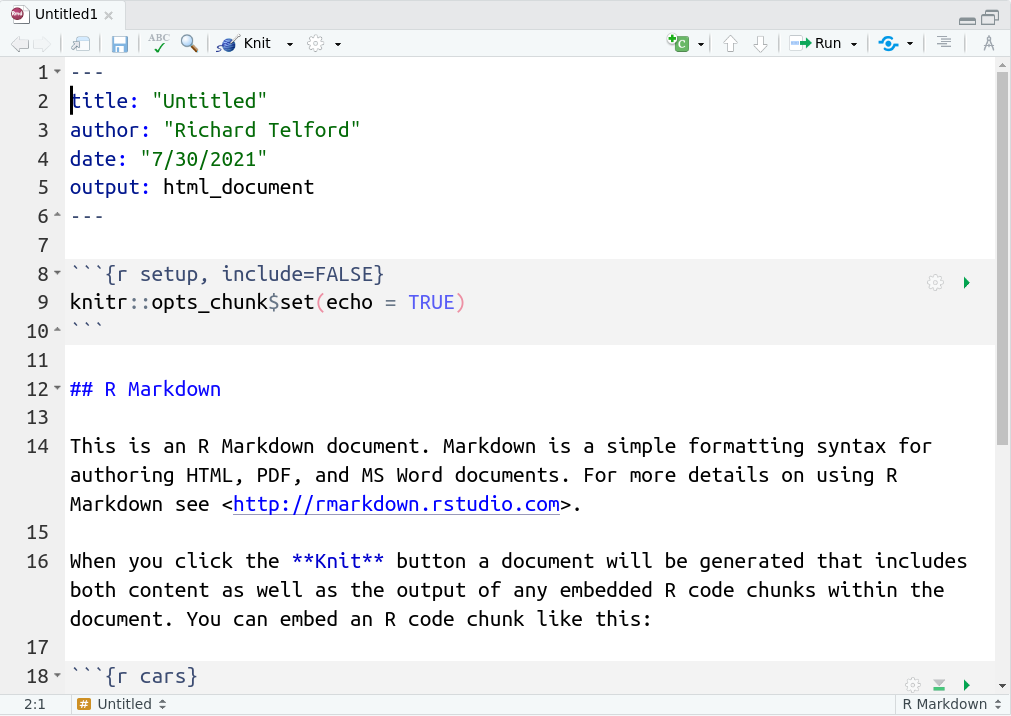
Figure 2.2: The default R markdown document.
You will learn about the elements of this file in section 3.